> For the complete documentation index, see [llms.txt](https://document.timemint.co/timemint/llms.txt). Markdown versions of documentation pages are available by appending `.md` to page URLs; this page is available as [Markdown](https://document.timemint.co/timemint/untitled.md).
# วิธีใช้งานวันหยุดสะสม (สลับวันหยุด)
หากมีวันหยุดสะสมอยู่สามารถนำไปใช้ตามวันที่ต้องการหยุด (ต้องรออนุมัติรายการ) หรือหากจะใช้วันหยุดสะสมตอนที่ยังไม่มีวันหยุดสะสมก็ได้ แต่วันหยุดสะสมจะติดลบ ต้องมาทำงานในวันหยุดและต้องกดขอวันหยุดสะสมของวันที่มาทำงานในวันหยุดเพื่อคืนวันหยุดสะสมที่ได้หยุดไป
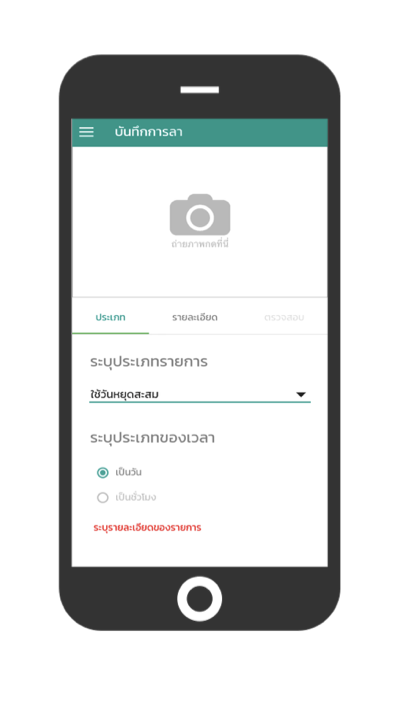
ไปที่ฟังก์ชันการลา
เลือก “ใช้วันหยุดสะสม”
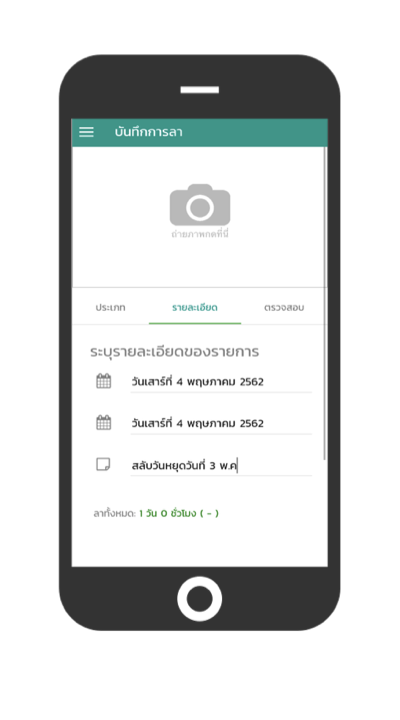
ระบุรายละเอียดวันที่ “ใช้หยุดสะสม”ระบุเหตุผล
“กดตรวจสอบเพื่อขอการอนุมัติ” จากหัวหน้าหรือฝ่ายบุคคล

รอการอนุมัติรายการจากหัวหน้าหรือฝ่ายบุคคล